
Download 18 FREE Maritime eBooks
How to Use “Google Alerts” to Find Maritime Jobs?
We assume that you are a fresh graduate, just out of a maritime academy, or an experienced maritime professional who is looking for a desperate change by finding a new job. You have already checked every website from the list of maritime job websites and have even posted your resume in each one of them. But we know that landing oneself a job is not an easy task, especially in this difficult economy. Moreover, keeping a constant watch on the latest job postings on all these maritime job sites can turn out to be a tedious task.
But as they say sometimes when you want something the most, there is no easy way out. The only way is to keep trying, hard and even harder. It may take few days, few weeks, or even few months to get a decent maritime job. However, if you carry out your job hunting smartly, you can reduce this time drastically.
Internet has made things extremely easy in almost all arenas, including the maritime jobs sector. In this article, we will learn about an unconventional way to keep yourself updated with the latest maritime job postings on the whole of world wide web, as and when it happens.

Let’s find out how to use “Google Alerts” to find a maritime job.
Find the step-by-step procedure to set up Google Alert in your Gmail Account.
1. First and foremost thing you would need to set up google alert service is a gmail account. If you don’t have one, make one here – Free Gmail Account
2. Now go to Google Alerts and Sign in with your Gmail Username and Password.
Go to Google Alerts
Your Google Alert Page Would Look like this
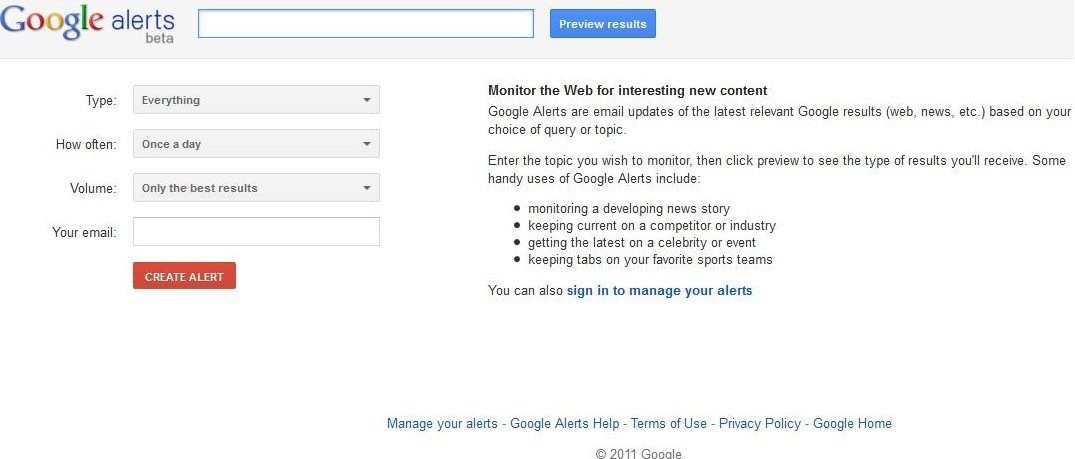
3. On the screen you will find 3 options to set-up. Select the three options as mentioned below:
- Type: Everything
- How Often: As-it-happens
- Volume: All results

If you have logged in using your gmail username and password, the “Your Email” Option would reflect your email id.
4. Now in the top-most space, beside the “Preview Results”, put a keyword which would reflect the type of maritime jobs you are looking for. We would put a general term to get a wide range of results. For e.g. –“ Merchant Navy Jobs”
After entering the appropriate keyword, hit “Preview Results”. You will get a preview on your right side.

5. If you are satisfied with the keyword and the preview, hit “Create Alert”. You will be taken to the list of your google alerts. You may create more alerts, by clicking “create a new alert”. Congratulations! You have just created your first google alert.
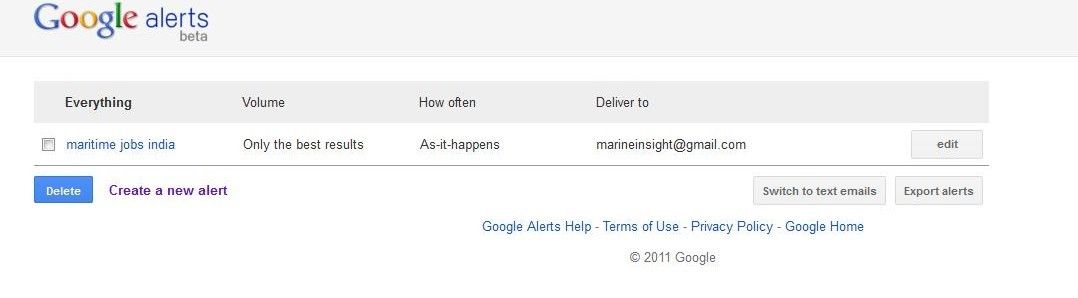
6. Once done, your gmail account will start receiving updates of the latest job postings around the internet on various maritime job websites and forum boards. (This might take from few minutes to few hours).
Below are some keywords you may use to generate alerts. You can generate as many keywords as you want.
Keywords:
- Merchant navy jobs
- Maritime jobs
- Marine Engineering jobs
- Deck Cadets Jobs
- Deck officer Jobs
- Ship’s Captain Jobs
Use your creativity with keywords and keep a watch on the type of alerts you receive. You can add or delete alerts according to your requirements.
Google Alerts is a useful tool not only to keep a track of various maritime jobs on the internet, but is also a great way to keep oneself updated with the latest maritime trends and news.
Disclaimer :
The information on this website is for general purposes only. While efforts are made to ensure accuracy, we make no warranties of any kind regarding completeness, reliability, or suitability. Any reliance you place on such information is at your own risk. We are not liable for any loss or damage arising from the use of this website.

About Author
Raunek Kantharia is a marine engineer turned maritime writer and entrepreneur. After a brief stint at the sea, he founded Marine Insight in 2010. Apart from managing Marine Insight, he also writes for a number of maritime magazines and websites.
Disclaimer :
The information on this website is for general purposes only. While efforts are made to ensure accuracy, we make no warranties of any kind regarding completeness, reliability, or suitability. Any reliance you place on such information is at your own risk. We are not liable for any loss or damage arising from the use of this website.
Related Articles



⚓️ Enhance Your Knowledge. Prevent Accidents. Stay Safe at Sea.
1. eBooks for Engine Department
Master machinery operations, troubleshooting, and safety procedures with expertly written guides tailored for marine engineers. Prevent costly breakdowns and onboard accidents through practical knowledge.
👉 Explore Engine Department eBooks
2. eBooks for Deck Department
Sharpen your seamanship, navigation, and cargo-handling skills with real-world case studies and practical insights designed for deck officers and cadets.
👉Discover Deck Department eBooks
3. eBooks on Electrical Fundamentals & Issues
Understand marine electrical systems, identify potential faults, and prevent onboard electrical failures with step-by-step explanations from industry experts.
4. Pocket Guides for Quick Reference
Compact, handy, and loaded with essential checklists—perfect for on-the-go reference during operations and emergencies at sea.
5. Combo Packs to Save Big
Access multiple expert eBooks at discounted prices. Ideal for professionals seeking complete safety and operational knowledge across various ship departments.
6. Digital Maritime Courses – Learn at Your Own Pace
Upgrade your competence with Marine Insight Academy’s online courses. Learn from industry professionals anytime, anywhere, and become a safer, smarter seafarer.
Subscribe To Our Daily Newsletter
By subscribing, you agree to our Privacy Policy and may receive occasional deal communications; you can unsubscribe anytime.

Nice article
@ Ashish : Glad you Liked it.
Fantastic idea sir…
Love and respect for you @anishwankhede sir